Quickstart Guide
To start a demo model training, you need to prepare three things: installation, dataset preparation, and model training configuration. In this guide, we will first cover the steps for dataset preparation and then briefly describe the model training configuration.
Installation
Please refer to the installation guide for instructions on how to install the necessary dependencies.
Dataset Preparation (Pre-training)
InternEvo训练任务的数据集包括一系列的bin和meta文件。使用tokenizer从原始文本文件生成训练用数据集。通过在tools/tokenizer.py中指定模型参数路径的方式来导入tokenizer模型。目前提供V7_sft.model来生成tokens。若想使用不同的模型,可直接修改tokernizer.py中的模型参数路径。
You can run the following command to generate bin and meta files corresponding to the original data. The parameter text_input_path represents the path of the original text data, currently supporting txt, json, and jsonl formats, while bin_output_path represents the save path of the generated bin files.
$ python tools/tokenizer.py --text_input_path your_input_text_path --bin_output_path your_output_bin_path
Here is an example of data processing:
Given a file raw_data.txt containing the raw dataset, the raw dataset is shown below:
感恩生活中的每一个细节,才能真正体会到幸福的滋味。
梦想是人生的动力源泉,努力追逐,才能实现自己的目标。
学会宽容和理解,才能建立真正和谐的人际关系。
You can generate the bin and meta files by running the following command:
$ python tools/tokenizer.py --text_input_path raw_data.txt --bin_output_path cn/output.bin
It should be noted that the generated bin files need to be saved in one of the following directories: cn, en, code, ja, ar, or kaoshi, depending on the type of dataset.
Here, cn represents the Chinese dataset, en represents the English dataset, code represents the code dataset, ja represents the Japanese dataset, ar represents the Arabic dataset, and kaoshi represents the exam dataset.
The format of the generated bin files is as follows:
{"tokens": [73075, 75302, 69522, 69022, 98899, 67713, 68015, 81269, 74637, 75445, 99157]}
{"tokens": [69469, 60355, 73026, 68524, 60846, 61844, 98899, 67775, 79241, 98899, 67713, 67800, 67453, 67838, 99157]}
{"tokens": [68057, 79017, 60378, 68014, 98899, 67713, 67990, 68015, 70381, 67428, 61003, 67622, 99157]}
Each line in the bin file corresponds to each sentence in the original dataset, representing the tokens of each sentence (referred to as sequence below).
The format of the generated meta file is as follows:
(0, 11), (90, 15), (208, 13)
Each tuple in the meta file represents the meta information of each sequence, where the first element in the tuple indicates the starting index of each sequence among all sequences, and the second element indicates the number of tokens for each sequence.
For example, the first sequence starts at index 0 and has 16 tokens. The second sequence starts at index 110 and has 24 tokens.
The bin and meta file formats for json and jsonl type files are the same as for txt, so we won’t go over them here.
Data Preparation (Fine-tuning)
The data format for fine-tuning tasks is the same as for pre-training tasks, which consists of a series of bin and meta files. Let’s take the Alpaca dataset as an example to explain the data preparation process for fine-tuning.
Download the Alpaca dataset.
Tokenize the Alpaca dataset using the following command:
python tools/alpaca_tokenizer.py /path/to/alpaca_dataset /path/to/output_dataset /path/to/tokenizer --split_ratio 0.1
It is recommended that users refer to alpaca_tokenizer.py to write new scripts to tokenize their own datasets
Training Configuration
Taking the configuration file configs/7B_sft.py for the 7B demo as an example,
JOB_NAME = "7b_train"
DO_ALERT = False

SEQ_LEN = 2048
HIDDEN_SIZE = 4096
NUM_ATTENTION_HEAD = 32
MLP_RATIO = 8 / 3
NUM_LAYER = 32
VOCAB_SIZE = 103168

MODEL_ONLY_FOLDER = "local:llm_ckpts/xxxx"
# Ckpt folder format:
# fs: 'local:/mnt/nfs/XXX'
SAVE_CKPT_FOLDER = "local:llm_ckpts"
LOAD_CKPT_FOLDER = "local:llm_ckpts/49"

# boto3 Ckpt folder format:
# import os
# BOTO3_IP = os.environ["BOTO3_IP"] # boto3 bucket endpoint
# SAVE_CKPT_FOLDER = f"boto3:s3://model_weights.{BOTO3_IP}/internlm"
# LOAD_CKPT_FOLDER = f"boto3:s3://model_weights.{BOTO3_IP}/internlm/snapshot/1/"
CHECKPOINT_EVERY = 50
ckpt = dict(
    enable_save_ckpt=False,  # enable ckpt save.
    save_ckpt_folder=SAVE_CKPT_FOLDER,  # Path to save training ckpt.
    # load_ckpt_folder= dict(path=MODEL_ONLY_FOLDER, content=["model"], ckpt_type="normal"),
    load_ckpt_folder="local:llm_ckpts/",
    # 'load_ckpt_info' setting guide:
    # 1. the 'path' indicate ckpt path,
    # 2. the 'content‘ means what states will be loaded, support: "model", "sampler", "optimizer", "scheduler", "all"
    # 3. the ’ckpt_type‘ means the type of checkpoint to be loaded, now only 'normal' type is supported.
    load_ckpt_info=dict(path=MODEL_ONLY_FOLDER, content=("model",), ckpt_type="internlm"),
    checkpoint_every=CHECKPOINT_EVERY,
    async_upload=True,  # async ckpt upload. (only work for boto3 ckpt)
    async_upload_tmp_folder="/dev/shm/internlm_tmp_ckpt/",  # path for temporarily files during asynchronous upload.
    oss_snapshot_freq=int(CHECKPOINT_EVERY / 2),  # snapshot ckpt save frequency.
)

TRAIN_FOLDER = "/path/to/dataset"
VALID_FOLDER = "/path/to/dataset"
data = dict(
    seq_len=SEQ_LEN,
    # micro_num means the number of micro_batch contained in one gradient update
    micro_num=4,
    # packed_length = micro_bsz * SEQ_LEN
    micro_bsz=2,
    # defaults to the value of micro_num
    valid_micro_num=4,
    # defaults to 0, means disable evaluate
    valid_every=50,
    pack_sample_into_one=False,
    total_steps=50000,
    skip_batches="",
    rampup_batch_size="",
    # Datasets with less than 50 rows will be discarded
    min_length=50,
    # train_folder=TRAIN_FOLDER,
    # valid_folder=VALID_FOLDER,
    empty_cache_and_diag_interval=10,
    diag_outlier_ratio=1.1,
)

grad_scaler = dict(
    fp16=dict(
        # the initial loss scale, defaults to 2**16
        initial_scale=2**16,
        # the minimum loss scale, defaults to None
        min_scale=1,
        # the number of steps to increase loss scale when no overflow occurs
        growth_interval=1000,
    ),
    # the multiplication factor for increasing loss scale, defaults to 2
    growth_factor=2,
    # the multiplication factor for decreasing loss scale, defaults to 0.5
    backoff_factor=0.5,
    # the maximum loss scale, defaults to None
    max_scale=2**24,
    # the number of overflows before decreasing loss scale, defaults to 2
    hysteresis=2,
)

hybrid_zero_optimizer = dict(
    # Enable low_level_optimzer overlap_communication
    overlap_sync_grad=True,
    overlap_sync_param=True,
    # bucket size for nccl communication params
    reduce_bucket_size=512 * 1024 * 1024,
    # grad clipping
    clip_grad_norm=1.0,
)

loss = dict(
    label_smoothing=0,
)

adam = dict(
    lr=1e-4,
    adam_beta1=0.9,
    adam_beta2=0.95,
    adam_beta2_c=0,
    adam_eps=1e-8,
    weight_decay=0.01,
)

lr_scheduler = dict(
    total_steps=data["total_steps"],
    init_steps=0,  # optimizer_warmup_step
    warmup_ratio=0.01,
    eta_min=1e-5,
    last_epoch=-1,
)

beta2_scheduler = dict(
    init_beta2=adam["adam_beta2"],
    c=adam["adam_beta2_c"],
    cur_iter=-1,
)

model = dict(
    checkpoint=False,  # The proportion of layers for activation aheckpointing, the optional value are True/False/[0-1]
    num_attention_heads=NUM_ATTENTION_HEAD,
    embed_split_hidden=True,
    vocab_size=VOCAB_SIZE,
    embed_grad_scale=1,
    parallel_output=True,
    hidden_size=HIDDEN_SIZE,
    num_layers=NUM_LAYER,
    mlp_ratio=MLP_RATIO,
    apply_post_layer_norm=False,
    dtype="torch.float16",  # Support: "torch.float16", "torch.half", "torch.bfloat16", "torch.float32", "torch.tf32"
    norm_type="rmsnorm",
    layer_norm_epsilon=1e-5,
    use_flash_attn=True,
    num_chunks=1,  # if num_chunks > 1, interleaved pipeline scheduler is used.
)
"""
zero1 parallel:
    1. if zero1 <= 0, The size of the zero process group is equal to the size of the dp process group,
        so parameters will be divided within the range of dp.
    2. if zero1 == 1, zero is not used, and all dp groups retain the full amount of model parameters.
    3. zero1 > 1 and zero1 <= dp world size, the world size of zero is a subset of dp world size.
        For smaller models, it is usually a better choice to split the parameters within nodes with a setting <= 8.
pipeline parallel (dict):
    1. size: int, the size of pipeline parallel.
    2. interleaved_overlap: bool, enable/disable communication overlap when using interleaved pipeline scheduler.
tensor parallel: tensor parallel size, usually the number of GPUs per node.
"""
parallel = dict(
    zero1=8,
    pipeline=dict(size=1, interleaved_overlap=True),
    sequence_parallel=False,
)

cudnn_deterministic = False
cudnn_benchmark = False

monitor = dict(
    # feishu alert configs
    alert=dict(
        enable_feishu_alert=DO_ALERT,
        feishu_alert_address=None,  # feishu webhook to send alert message
        light_monitor_address=None,  # light_monitor address to send heartbeat
    ),
)
let’s discuss the data, model, parallel and monitoring configurations required to start a model training.
Data Configuration
Here are the key parameters and their explanations for data configuration:
TRAIN_FOLDER = "/path/to/dataset"
SEQ_LEN = 2048
data = dict(
    seq_len=SEQ_LEN,  # 数据样本长度,默认值为 2048
    micro_num=1,  # micro_num 是指在一次模型参数更新中会处理的 micro_batch 的数目,默认值为 1
    micro_bsz=1,  # packed_length = micro_bsz * SEQ_LEN,为一次处理的 micro_batch 的数据大小,默认值为 1
    total_steps=50000,  # 总的所需执行的 step 的数目,默认值为 50000
    min_length=50,  # 若数据集文件中,数据行数少于50,将会被废弃
    train_folder=TRAIN_FOLDER,  # 数据集文件路径,默认值为 None;若 train_folder 为空,则以自动生成的随机数据集进行训练测试
    pack_sample_into_one=False, # 数据整理的逻辑,决定是按照 seq_len 维度或者是 sequence 的真实长度来进行attention计算
)
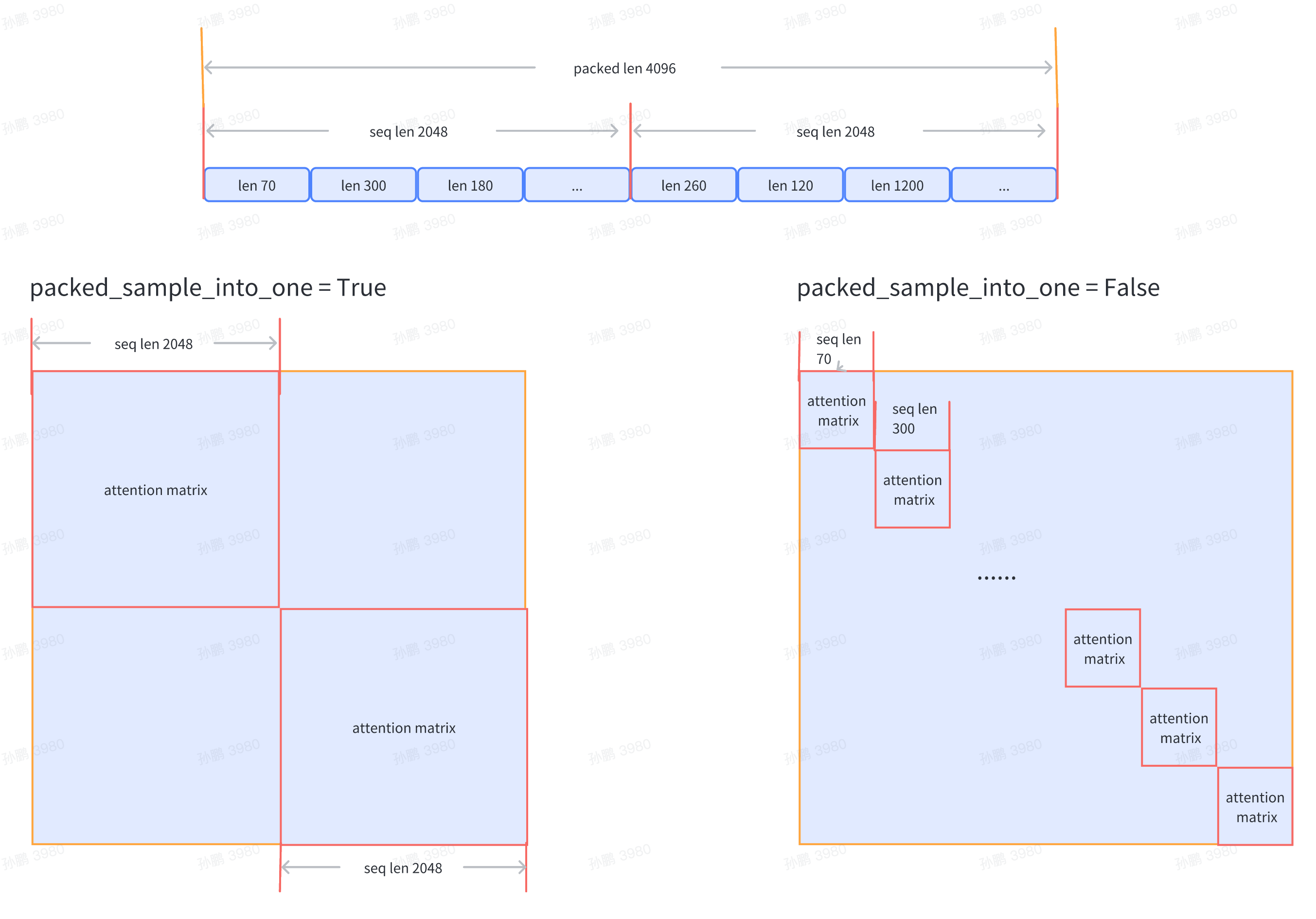
Currently, it supports passing the dataset file path train_folder, and the file format is required to be as follows:
- folder
    - code
        train_000.bin
        train_000.bin.meta
For detailed information about the dataset, please refer to the “Data Preparation” section.
Model Configuration
If you want to load a model checkpoint when starting the training, you can configure it as follows:
SAVE_CKPT_FOLDER = "local:/path/to/save/ckpt"
LOAD_CKPT_FOLDER = "local:/path/to/load/resume/ckpt"
ckpt = dict(
    save_ckpt_folder=SAVE_CKPT_FOLDER,  # 存储模型和优化器 checkpoint 的路径
    checkpoint_every=float("inf"),  # 每多少个 step 存储一次 checkpoint,默认值为 inf
    # 断点续训时,加载模型和优化器等权重的路径,将从指定的 step 恢复训练
    # content 表示哪些状态会被加载,支持: "model", "sampler", "optimizer", "scheduler", "all"
    # ckpt_type 表示加载的模型类型,目前支持: "internlm"
    load_ckpt_info=dict(path=MODEL_ONLY_FOLDER, content=("model",), ckpt_type="internlm"),
)
Note:
If the path starts with
local:, it means the file is stored in the local file system. If it starts withboto3:, it means the file is stored in the remote OSS.
The configuration for the model is as follows:
model_type = "INTERNLM"  # 模型类型,默认值为 "INTERNLM",对应模型结构初始化接口函数
NUM_ATTENTION_HEAD = 32
VOCAB_SIZE = 103168
HIDDEN_SIZE = 4096
NUM_LAYER = 32
MLP_RATIO = 8 / 3
model = dict(
    checkpoint=False,   # 进行重计算的模型层数比例,可选值为 True/False/[0-1]
    num_attention_heads=NUM_ATTENTION_HEAD,
    embed_split_hidden=True,
    vocab_size=VOCAB_SIZE,
    embed_grad_scale=1,
    parallel_output=True,
    hidden_size=HIDDEN_SIZE,
    num_layers=NUM_LAYER,
    mlp_ratio=MLP_RATIO,
    apply_post_layer_norm=False,
    dtype="torch.bfloat16",
    norm_type="rmsnorm",
    layer_norm_epsilon=1e-5,
)
Note: Users can customize the model type name and model structure, and configure the corresponding model parameters. The model initialization function interface can be registered through the MODEL_INITIALIZER object in utils/registry.py. When initializing the model in the training main function train.py, the specified model initialization interface function can be obtained through the model_type configuration.
If you want to start training based on InternLM 7B, you can refer to OpenXLab ModelZoo to download weights.
Parallel Configuration
Training parallel configuration example:
parallel = dict(
    zero1=8,
    tensor=1,
    pipeline=dict(size=1, interleaved_overlap=True),
    sequence_parallel=False,
)
zero1: zero parallel strategy, divided into the following three cases, default value is -1
When
zero1 <= 0, the size of the zero1 process group is equal to the size of the data parallel process group, so the optimizer state parameters will be split within the data parallel range.When
zero1 == 1, zero1 is not used, and all data parallel groups retain the complete optimizer state parameters.When
zero1 > 1andzero1 <= data_parallel_world_size, the zero1 process group is a subset of the data parallel process group.
tensor: tensor parallel size, usually the number of GPUs per node, default is 1
pipeline: pipeline parallel strategy
size: pipeline parallel size, the default value is 1
interleaved_overlap: bool type, when interleaved scheduling, enable or disable communication optimization, the default value is False
sequence_parallel: Whether to enable sequence parallelism, the default value is False
Note: Data parallel size = Total number of GPUs / Pipeline parallel size / Tensor parallel size
Start Training
After completing the data preparation and relevant training configurations mentioned above, you can start the demo training. The following examples demonstrate how to start the training in both slurm and torch environments.
If you want to start distributed training on slurm with 16 GPUs across multiple nodes, use the following command:
$ srun -p internllm -N 2 -n 16 --ntasks-per-node=8 --gpus-per-task=1 python train.py --config ./configs/7B_sft.py
If you want to start distributed training on torch with 8 GPUs on a single node, use the following command:
$ torchrun --nnodes=1 --nproc_per_node=8 train.py --config ./configs/7B_sft.py --launcher "torch"
Training Results
Taking the configuration of the demo training on a single machine with 8 GPUs on slurm as an example, the training result log is shown below:
2023-07-07 12:26:58,293	INFO launch.py:228 in launch -- Distributed environment is initialized, data parallel size: 8, pipeline parallel size: 1, tensor parallel size: 1
2023-07-07 12:26:58,293	INFO parallel_context.py:535 in set_seed -- initialized seed on rank 2, numpy: 1024, python random: 1024, ParallelMode.DATA: 1024, ParallelMode.TENSOR: 1024,the default parallel seed is ParallelMode.DATA.
2023-07-07 12:26:58,295	INFO train.py:378 in main -- ===========New Run Jul07_12-26-58 on host:SH-IDC1-10-140-0-135,tp:0,pp=0,dp=0===========
2023-07-07 12:26:58,296	INFO train.py:378 in main -- ===========New Run Jul07_12-26-58 on host:SH-IDC1-10-140-0-135,tp:0,pp=0,dp=5===========
2023-07-07 12:26:58,296	INFO train.py:378 in main -- ===========New Run Jul07_12-26-58 on host:SH-IDC1-10-140-0-135,tp:0,pp=0,dp=1===========
2023-07-07 12:26:58,296	INFO train.py:378 in main -- ===========New Run Jul07_12-26-58 on host:SH-IDC1-10-140-0-135,tp:0,pp=0,dp=6===========
2023-07-07 12:26:58,296	INFO train.py:378 in main -- ===========New Run Jul07_12-26-58 on host:SH-IDC1-10-140-0-135,tp:0,pp=0,dp=7===========
2023-07-07 12:26:58,296	INFO train.py:378 in main -- ===========New Run Jul07_12-26-58 on host:SH-IDC1-10-140-0-135,tp:0,pp=0,dp=2===========
2023-07-07 12:26:58,296	INFO train.py:378 in main -- ===========New Run Jul07_12-26-58 on host:SH-IDC1-10-140-0-135,tp:0,pp=0,dp=4===========
2023-07-07 12:26:58,296	INFO train.py:378 in main -- ===========New Run Jul07_12-26-58 on host:SH-IDC1-10-140-0-135,tp:0,pp=0,dp=3===========
2023-07-07 12:28:27,826	INFO hybrid_zero_optim.py:295 in _partition_param_list -- Number of elements on ranks: [907415552, 907411456, 910163968, 910163968, 921698304, 921698304, 921698304, 921698304], rank:0
2023-07-07 12:28:57,802	INFO train.py:323 in record_current_batch_training_metrics -- tflops=63.27010355651958,step=0,loss=11.634403228759766,tgs (tokens/gpu/second)=1424.64,lr=4.0000000000000003e-07,loss_scale=65536.0,grad_norm=63.672620777841004,micro_num=4,num_consumed_tokens=131072,inf_nan_skip_batches=0,num_samples_in_batch=19,largest_length=2048,largest_batch=5,smallest_batch=4,adam_beta2=0.95,fwd_bwd_time=6.48
2023-07-07 12:29:01,636	INFO train.py:323 in record_current_batch_training_metrics -- tflops=189.83371103277346,step=1,loss=11.613704681396484,tgs (tokens/gpu/second)=4274.45,lr=6.000000000000001e-07,loss_scale=65536.0,grad_norm=65.150786641452,micro_num=4,num_consumed_tokens=262144,inf_nan_skip_batches=0,num_samples_in_batch=16,largest_length=2048,largest_batch=5,smallest_batch=3,adam_beta2=0.95,fwd_bwd_time=3.67
2023-07-07 12:29:05,451	INFO train.py:323 in record_current_batch_training_metrics -- tflops=190.99928472960033,step=2,loss=11.490386962890625,tgs (tokens/gpu/second)=4300.69,lr=8.000000000000001e-07,loss_scale=65536.0,grad_norm=61.57798028719357,micro_num=4,num_consumed_tokens=393216,inf_nan_skip_batches=0,num_samples_in_batch=14,largest_length=2048,largest_batch=4,smallest_batch=3,adam_beta2=0.95,fwd_bwd_time=3.66
2023-07-07 12:29:09,307	INFO train.py:323 in record_current_batch_training_metrics -- tflops=188.8613541410694,step=3,loss=11.099515914916992,tgs (tokens/gpu/second)=4252.55,lr=1.0000000000000002e-06,loss_scale=65536.0,grad_norm=63.5478796484391,micro_num=4,num_consumed_tokens=524288,inf_nan_skip_batches=0,num_samples_in_batch=16,largest_length=2048,largest_batch=5,smallest_batch=3,adam_beta2=0.95,fwd_bwd_time=3.7
2023-07-07 12:29:13,147	INFO train.py:323 in record_current_batch_training_metrics -- tflops=189.65918563194305,step=4,loss=10.149517059326172,tgs (tokens/gpu/second)=4270.52,lr=1.2000000000000002e-06,loss_scale=65536.0,grad_norm=51.582841631508145,micro_num=4,num_consumed_tokens=655360,inf_nan_skip_batches=0,num_samples_in_batch=19,largest_length=2048,largest_batch=6,smallest_batch=3,adam_beta2=0.95,fwd_bwd_time=3.68
2023-07-07 12:29:16,994	INFO train.py:323 in record_current_batch_training_metrics -- tflops=189.3109313713174,step=5,loss=9.822169303894043,tgs (tokens/gpu/second)=4262.67,lr=1.4000000000000001e-06,loss_scale=65536.0,grad_norm=47.10386835560855,micro_num=4,num_consumed_tokens=786432,inf_nan_skip_batches=0,num_samples_in_batch=17,largest_length=2048,largest_batch=6,smallest_batch=3,adam_beta2=0.95,fwd_bwd_time=3.69
Long Text Generation
In the inference phase, we can use Dynamic NTK RoPE instead of the original RoPE, allowing the model to handle long-text input and output, achieving extrapolation effects up to 16K. Currently, InternLM supports the use of Dynamic NTK RoPE in models formatted in both Hugging Face format and InternLM’s native format.
For models in Hugging Face format, Dynamic NTK RoPE is currently enabled by default. If users wish to disable this behavior, they can modify
rotary.typein theconfig.jsonfile toorigin.For models in InternLM’s native format, during inference, you can enable this behavior by adding use_dynamic_ntk_rope=True to the configuration dictionary when initializing the model.
Users can visually compare and observe how Dynamic NTK RoPE takes effect directly through the web_demo. For example, in the file Long Text Example, there is a text with token length exceeding 2200. Without using Dynamic NTK, the model is unable to answer questions related to this text. However, after applying Dynamic NTK RoPE, the response from the InternLM Chat 7B v1.1 model is as follows:

Regarding the principle of Dyanmic NTK, please refer to